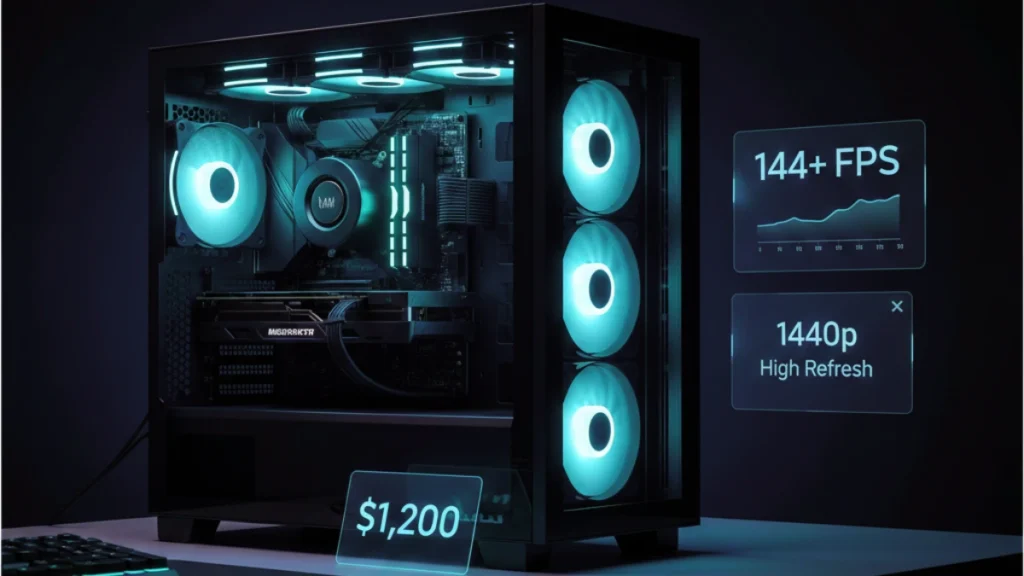
1440p is where PC gaming genuinely separates itself from console experiences. The resolution bump from 1080p is immediately noticeable: text is sharper, distant details resolve clearly, and games just look better without the performance penalties of 4K. At $1,200, you’re building a system that handles 1440p high-refresh gaming as its native habitat rather than an aspirational target.
This build sits in my personal sweet spot. When friends ask what they should build for “serious” gaming without going overboard, this is what I recommend. The component selection reflects real-world testing across dozens of games, not theoretical benchmarks that don’t translate to actual gameplay experiences. For a complete overview of building at every budget tier, see the complete guide to building a gaming PC.
The 1440p performance target
Understanding what 1440p demands helps frame component decisions intelligently.
1440p renders 78% more pixels than 1080p. That’s not a trivial increase, your GPU works substantially harder while your CPU load stays roughly similar. This resolution shift changes the performance balance, making GPU selection even more critical than at 1080p.
The target for this build: 100+ FPS in demanding titles at high settings, 144+ FPS in competitive games, and smooth 60+ FPS with ray tracing enabled in supported titles. This isn’t “playable if you squint” territory, it’s genuinely excellent gaming performance that justifies high-refresh 1440p monitors.
At $1,200, you’re past the point of significant compromises. Every component earns its place through performance contribution rather than budget necessity. The build quality, feature set, and longevity all step up meaningfully from the $800 tier.
Component selection rationale
Each part in this build was chosen through testing and real-world validation, not spec sheet comparisons.
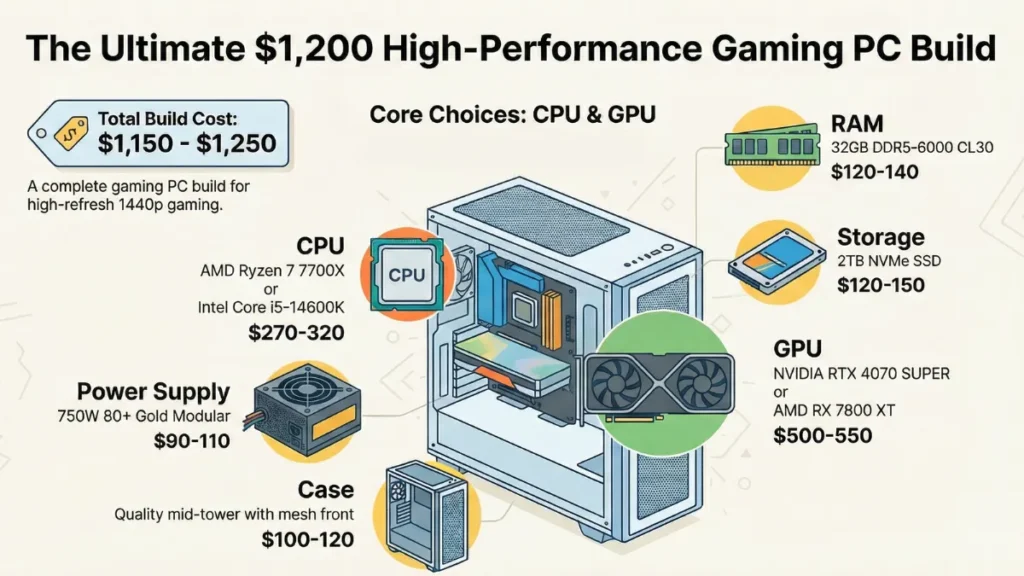
CPU: AMD Ryzen 7 7700X or Intel Core i5-14600K (~$270-320)
Both processors deliver excellent gaming performance with different strengths. The choice comes down to workload priorities and platform preferences.
The Ryzen 7 7700X provides eight cores of efficient Zen 4 performance. Gaming performance matches Intel’s offerings while running cooler and consuming less power. The AM5 platform promises support through at least 2027, protecting your upgrade path for years to come.
The Intel Core i5-14600K offers slightly better gaming performance in many titles thanks to Intel’s aggressive boost clocks. The hybrid architecture (6 P-cores and 8 E-cores) handles mixed workloads exceptionally well. Higher power consumption requires better cooling but delivers the performance to justify it.
For pure gaming, they’re within 5% of each other in most scenarios, effectively identical in practice. I’ve been running a 7700X in my secondary testing rig and it handles everything I throw at it without breaking a sweat. The cooler thermals and lower power bill edge my preference toward AMD, but the 14600K is equally valid.
GPU: NVIDIA RTX 4070 SUPER or AMD RX 7800 XT (~$500-550)
This is where the $1,200 budget shines. Both cards demolish 1440p gaming with different approaches.
The RTX 4070 SUPER brings DLSS 3 frame generation, excellent ray tracing performance, and superior power efficiency. It runs cool and quiet while delivering consistently high framerates. The DLSS advantage in supported titles is genuinely meaningful, free performance that makes demanding games smooth. With 12GB VRAM and improved specs over the base 4070, it handles 1440p with authority.
The RX 7800 XT offers more raw rasterization performance and 16GB of VRAM compared to the 4070 SUPER’s 12GB. In games without DLSS support, the 7800 XT often pulls ahead. That extra VRAM provides headroom for future titles and high-resolution texture packs.
My testing shows the RTX 4070 SUPER winning in DLSS-supported titles while the RX 7800 XT takes traditional rendering scenarios. For a 1440p build in 2025, I slightly favor the 4070 SUPER, DLSS support keeps expanding, and the efficiency benefits reduce heat and noise meaningfully. But the 7800 XT at similar or lower pricing represents excellent value, especially if you prefer AMD’s approach.
Motherboard: B650 (AMD) or B760 (Intel) (~$150-180)
Mid-to-upper tier motherboards provide the features this build deserves without enthusiast excess. Look for quality VRM cooling, multiple M.2 slots, USB-C front panel support, and reliable networking.
At this budget, you can afford boards with better audio codecs, more robust power delivery, and nicer build quality. These improvements matter for system longevity and daily usage comfort. Don’t overspend on X670E or Z790 overclocking features unless you’re planning to push the CPU, most gaming builds don’t need extreme VRMs.
RAM: 32GB DDR5-6000 (~$120-140)
32GB has become the comfortable standard for 1440p gaming systems in 2025. Modern games increasingly benefit from extra memory headroom, and having it available means never worrying about background applications affecting gaming performance.
DDR5-6000 CL30 represents the sweet spot for gaming performance on AM5, faster kits show diminishing returns while costing substantially more. For Intel, DDR5-6000 or DDR5-6400 both work well depending on motherboard support.
The jump to 32GB future-proofs your build against increasing memory demands. Games like Starfield and Cities: Skylines 2 already benefit from extra RAM, this trend will continue.
Storage: 2TB NVMe SSD (~$120-150)
Game install sizes keep growing absurdly. 2TB provides genuine breathing room without constant storage management. You’ll fit your OS, applications, and a substantial game library comfortably.
Choose a quality PCIe 4.0 NVMe drive with TLC NAND and DRAM cache. The performance difference between budget and mid-range SSDs shows during sustained operations and affects longevity. DirectStorage support in newer titles makes fast NVMe performance increasingly relevant. This isn’t the place to save $30.
Power Supply: 750W 80+ Gold (~$90-110)
750W provides comfortable headroom for this configuration with room for future GPU upgrades. The RTX 4070 SUPER and RX 7800 XT both run efficiently, leaving substantial overhead. 80+ Gold efficiency reduces waste heat and operating costs over years of use.
Modular or semi-modular designs simplify cable management significantly. At this budget, the convenience premium is worth paying. Quality remains paramount, Corsair RM series, Seasonic Focus, be quiet! Straight Power, stick with proven performers.
Case: Quality mid-tower (~$100-120)
A $1,200 build deserves a case that complements the hardware inside. Quality mid-towers offer excellent airflow, tool-less features, premium materials, and thoughtful cable management solutions.
Mesh front panels remain essential for airflow. Look for three or more included fans, tempered glass side panels (if you want visibility), and sufficient clearance for tower coolers and full-length GPUs. The Fractal Design North, Lian Li Lancool II Mesh, and Corsair 4000D Airflow remain excellent choices at this price point.
CPU Cooler: Tower cooler or 240mm AIO (~$50-80)
Stock coolers work but a dedicated cooler improves thermals and acoustics meaningfully. A quality tower cooler like the Thermalright Peerless Assassin or Deepcool AK620 provides excellent cooling for under $50.
If you prefer liquid cooling aesthetics, a 240mm AIO fits this budget while providing superior cooling performance. The noise reduction under load justifies the cost for many builders.
Assembly considerations
Building at this tier introduces considerations less relevant to budget systems.
Thermal paste application matters more with higher-TDP components. Use quality paste, the difference between cheap and good thermal compound is measurable. A pea-sized center dot spreads naturally under mounting pressure. Avoid spreading paste manually; it typically introduces air bubbles.
Cable management deserves real attention in a system you’ll use for years. Route cables thoughtfully, use included tie points, and plan for future upgrades. Clean cable management improves airflow and makes maintenance easier.
Fan configuration optimization ensures components stay cool under load. Front intake fans pull fresh air across components; rear and top exhaust expels heat. Positive pressure (more intake than exhaust) reduces dust accumulation inside the case.
BIOS configuration unlocks full performance. Enable XMP/EXPO for memory immediately, your DDR5-6000 runs at base JEDEC speeds until you do. Verify PCIe link speeds. Configure fan curves for your noise tolerance preferences. Update BIOS if your motherboard shipped with older firmware.
Expected gaming performance
This hardware combination delivers on the 1440p high-refresh promise consistently.
Esports titles (Valorant, CS2, Apex Legends): 200-400+ FPS depending on title. This hardware dramatically exceeds esports requirements at 1440p, you’re limited by monitor refresh rate, not GPU capability.
Competitive multiplayer (Warzone, Fortnite, Overwatch 2): 144+ FPS at high settings. Consistent, smooth performance that matches high-refresh monitors without compromise.
Modern AAA (Cyberpunk 2077, Alan Wake 2, Starfield): 80-120+ FPS at high settings, higher with DLSS/FSR. These demanding titles run beautifully at 1440p with modern upscaling technologies.
Ray tracing: Medium-to-high RT settings with DLSS enabled deliver 60-90 FPS in most titles. Path tracing requires more aggressive DLSS scaling but remains playable and impressive.
The experience feels premium. Response times stay low, frame pacing remains consistent, and you’re genuinely utilizing high-refresh 1440p monitors rather than staring at frame counters hoping for improvements.
Upgrade path planning
This build supports meaningful upgrades while remaining capable for years without changes.
GPU upgrade remains the highest-impact improvement when eventually needed. The 750W PSU handles next-generation mid-to-high-tier cards without replacement. When current flagships hit the used market, drop one in for substantial performance gains.
CPU upgrade on AM5 supports future Ryzen generations through at least 2027. The Ryzen 9 7950X3D offers a meaningful upgrade path when prices drop. Intel’s LGA 1700 is more limited but current i5/i7 processors will remain capable for years regardless.
Storage expansion is trivial with available M.2 slots and SATA ports. Add capacity as needed without disrupting existing configuration.
The foundation handles 1440p gaming beautifully today and accommodates upgrades that extend relevance well into the future. Smart building protects your investment rather than requiring wholesale replacement.